

One Subscription. Your Entire Staff Training Library
Online Staff Training for California RCFE & ARF Facilities
Give your team access to ALL of CCO's online staff training courses while keeping everything organized in one convenient learning portal.
Assign courses, monitor employee progress, download completion certificates, and simplify training management—all starting at just $50/month..


Managing Staff Training Doesn't Have to Be Complicated
Between onboarding new employees, keeping up with annual training, and maintaining accurate records, managing staff education can quickly become overwhelming.
CCO's Staff Training Subscription gives RCFE and ARF administrators the tools to manage employee training in one place.
With your subscription, you can:
Access CCO's entire online staff training course library.
Assign training based on employee roles and facility needs.
Monitor individual employee progress and course completion.
Download certificates and generate training reports.
Manage employees through your own administrator portal.
Keep training documentation organized and accessible.
Whether you're managing 5 employees or 150, our subscription makes it easier to keep your team trained and your records organized.
How It Works

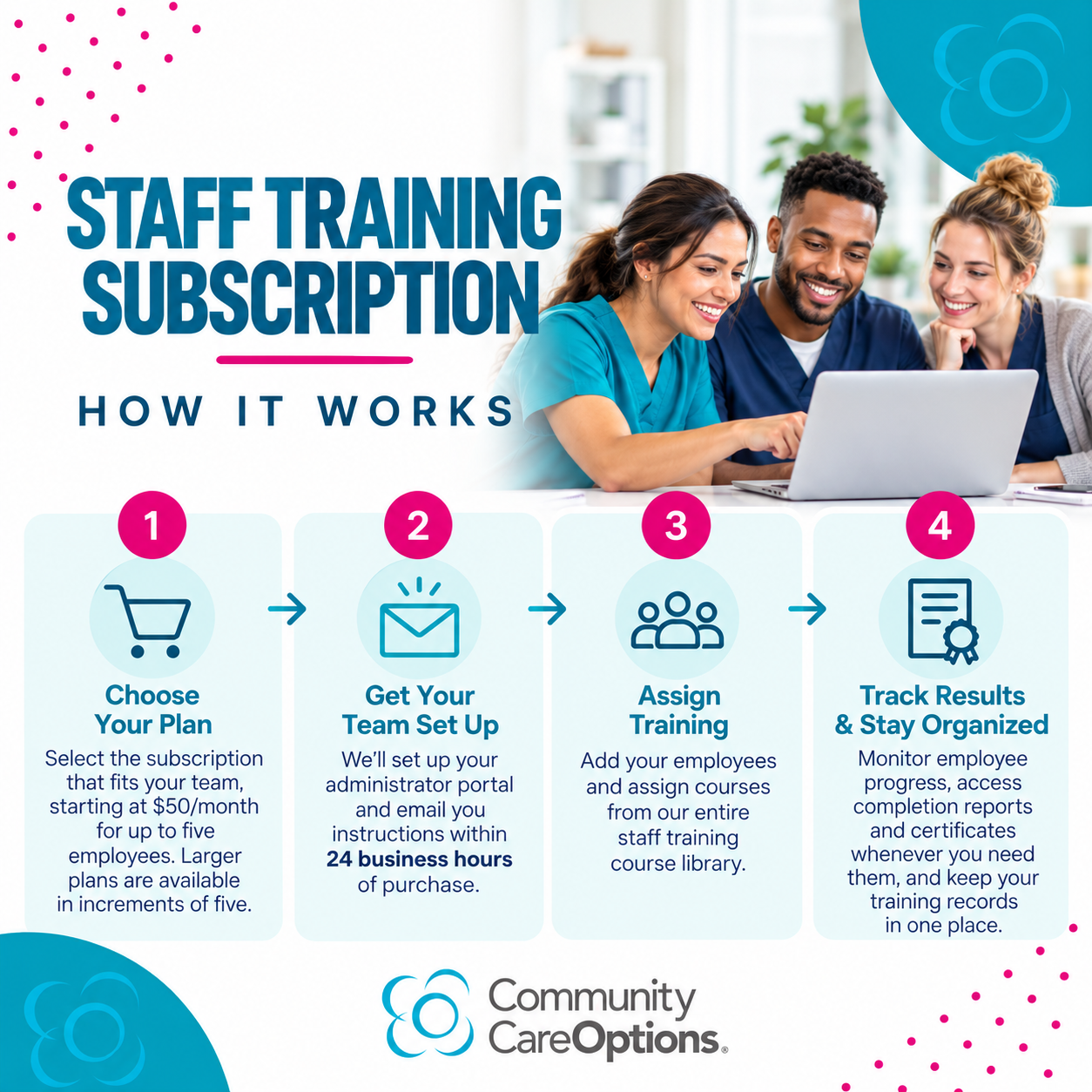
Choose a plan
Select the subscription that fits your team, starting at $50/month. Plans are available in increments of five employees.
We’ll provide your learning site and admin access by email within 24 business hours.
We Set Up Your Portal

Assign and Track
Access employee training records, completion reports, and certificates whenever you need them, making it easier to maintain documentation and prepare for licensing reviews.

See Results
Staff are trained on time with verifiable records. You pass audits with clean documentation and spend less time on paperwork, more time for residents



Everything You Need to Manage Staff Training
Unlimited Course Library Access
Give your employees access to CCO's entire online staff training library, including dementia care, medication management, infection control, emergency preparedness, hospice care, personal care, and more.
Administrator Training Portal
Manage your team, assign courses, and oversee employee training from one convenient dashboard.
Employee Progress Tracking
See which courses employees have started, what they've completed, and where additional training may be needed.
Certificates & Reporting
Access completion certificates and generate training reports to help maintain accurate employee records.
Flexible Plans for Growing Teams
Choose a subscription based on your team size, starting at just $50/month for up to five employees, with additional options as your facility grows.
Get Started
Plans start at $50/month for up to five users.
All plans include the entire staff training course library.
Administrator portal, reporting, and certificate management are included.
Minimum commitments vary by plan size.
Choose the user count that fits your team and commitment window:
1-5 users — $50 - 6‑month minimum
6-10 users — $90 - 6‑month minimum
11-15 users — $120 - 12‑month minimum
16-20 users — $150 - 12 month minimum
21-24 users — $175 - 12 month minimum
25-30 users — ‑$200 - 12 month minimum
31-35 users — ‑$230 - 12 month minimum
36-40 users — ‑$250 - 12 month minimum
41-45 users — ‑$270 - 12 month minimum
46-50 users — ‑$285 - 12 month minimum
51-55 users — ‑$300 - 12 month minimum
60+ users - reach out for a custom quote.
Your card is billed monthly and continues beyond the initial term if not cancelled. Portal is provisioned within 24 business hours after signup.
Staff Training Made Simple
Give your RCFE or ARF team access to Community Care Options' entire online staff training course library, plus the tools to manage employee training in one convenient portal.
Every subscription includes:
Full course library access for your enrolled employees
Administrator portal to assign courses and manage staff
Progress tracking, reporting, and completion certificates
Flexible plans for an unlimited number of employees, starting at $50/month
Quick setup — portal access within one business day
Subscription Details
Plans are available in increments of 5 employees.
For 60+ employees, email cco@communitycareoptions.com for a custom quote.
Monthly billing with a 6- or 12-month minimum commitment, depending on plan size.
Subscriptions continue monthly after the initial commitment and may be canceled once the minimum term has been fulfilled.
Select the number of employees below to get started!
Which Staff Training Option Is the Best Value for Your Team?
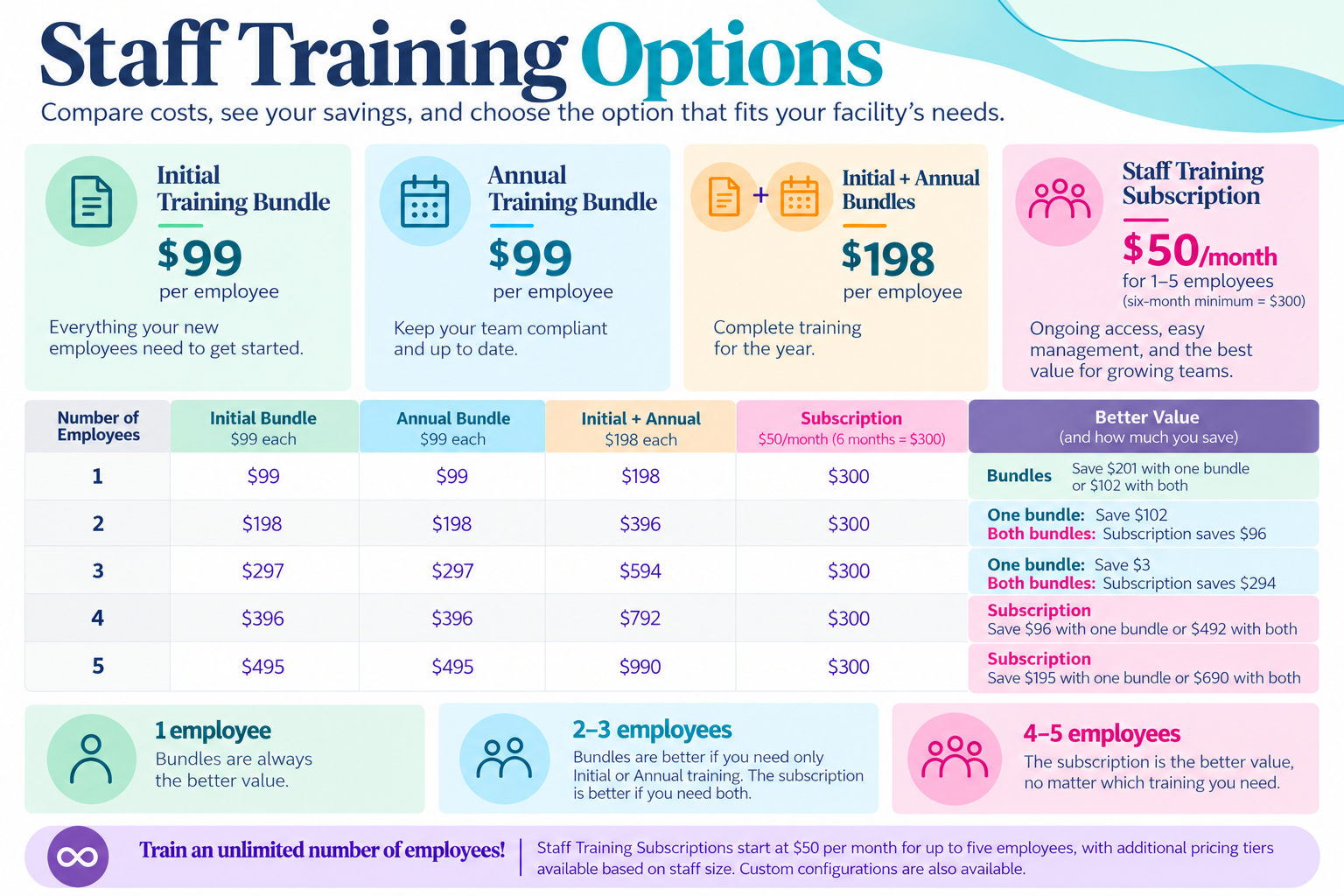
The best value depends on your team size and training needs. For one employee, an individual training bundle is the most affordable option unless you need administrative oversight and progress tracking. For 2–3 employees, bundles offer better savings if you only need Initial OR Annual Training, while the subscription provides greater value if you need BOTH. For 4–5 employees, the Staff Training Subscription is always the better value, offering access to both training options, ongoing course access, and convenient tools to manage employee training.
Use the chart below to compare costs and see how much your facility could save.
Course Library
Cal/OSHA M1: Introduction to Cal/OSHA
Cal/OSHA M2: Standards
Cal/OSHA M3: Injury & Illness Prevention Plan
Cal/OSHA M4: Enforcement of Cal/OSHA
COVID-19 & Infectious Diseases
Dementia M1: Basics of Dementia
Dementia M2: Levels of Dementia
Dementia M3: Alzheimer's Research
Dementia M4: Communication
Dementia M5: ABC's of Behavior
Dementia M6: Environment & Medications
Dementia M7: Sexuality
Dementia M8: Lewy Body Dementia
Dementia M9: Types of Dementia
Diabetes Training
Elder & Dependent Adult Abuse
EMPLOYEE Sexual Harassment and Abusive Conduct Prevention
Fire & Disaster M1: Emergency Preparedness
Fire & Disaster M2: Fire Preparedness
Fire & Disaster M3: Flood & Earthquake Preparedness
First Aid Training
Food Service & Safety M1: Menu Planning
Food Service & Safety M2: Foodborne Illness
Food Service & Safety M3
HIV/AIDS & Infectious Diseases M1
HIV/AIDS & Infectious Diseases M2
Hospice Care M1: Introduction to Hospice
Hospice Care M2: Grief and Support
Hospice Care M3: Pain Management
Laws & Regulations M3: Clients
LGBT Awareness & Sensitivity Training
Medication M1
Medication M1: Requirements and Regulations
Medication M2
Medication M2: Terminology
Medication M3
Medication M3: Common Medications
Medication M4: Identification and Handling
Medication M5: Antipsychotics and Psychotropic Drugs
Palliative Care
Personal Care Services, Nutrition & Exercise (1 Hour)
Physical Limitations & Needs of the Elderly (1 Hour)
Postural Supports, Restraints, & Restricted Health Conditions
Psychosocial Needs & Depression of the Elderly (1 Hour)
RCFE Laws & Regulations M4: Personal Rights
FAQs
-
Online modules provide 24 hours; the remaining 16 hours must be completed in person at your facility (shadowing/supervised practice).
-
No. This subscription is for staff training. For administrator CEUs, see Membership options.
-
We provision your portal promptly after signup and share admin access and a quick‑start guide.
-
You can manage users in your portal. Replace departing staff with new hires within your plan’s user limit.
-
Download certificates and run completion reports anytime for personnel files and audits.